Friday, April 25, 2014

SSIS failed with error code 0xC0209029

failed with error code 0xC0209029 

I am sure you have just come from a long line of internet searches to find this specific one. KUDOS to you sir, and this post may not have a fix for your error either.

Recently I received the error failed with error code 0xC0209029 error from SSIS when related to inserting rows into an OLE DB destination. The issue occurred during a package that had never failed in production, but had failed in the development environment for several days, but no issue seemed to be able to be found.

After looking around the internet, the variety of things that can cause this are many, but I would like to add one more.

IF you have a situation where you are trying to insert an identity key into a destination table, and the identity key already exists, it will produce this error.  Check to see if the identity key records for your table are not being inserted, and if they are, that the identity records do not already exist.

The situation that caused this error was because someone else was doing development in the dev environment without anyone giving notice, and the keys were for different data entirely, so it took a while to hunt the issue down. This should give you one more idea to look for the issue.


Friday, January 31, 2014

SSIS Error Message "the value is too long to fit in the data area of the buffer"

I recently hit this issue while doing some custom script task coding for an SSIS package, and it took me a while to figure out.  I found that this specific bug can happen from two situations.

1.  The definition of a file has the input definition that is higher than the output definition in the  file connection manager.  This causes a failure in a Dataflow Source component.  

2.  The actual buffer inside of a script task is too large.

For the first issue, this can be solved by making sure that the output size is the same as the input size.

For the second part, lets describe what is causing the issue.  When using a script task it has a finite amount of bytes that the input buffer can hold.  I have no idea what this finite set is, but it is rather large (but not as large as one would hope).  Because it has a finite buffer amount, it matters how much data you try to push through it.

In the scenario I hit the issue, I was trying to put 10 NTEXT columns into the script task, manipulate them, and output nvarchar(4000) size columns.  The input buffer was getting overflowed because NTEXT is relatively unbounded, and the data source I was using had several of the 10 columns with many thousands of characters in them.  

The trick to fixing this is to create multiple script tasks to do your manipulation.  Yes, this will look a bit odd, but it is the best way to approach the solution.

So, instead of using one, easily maintained and monolithic script task, use 2 of them and do half the work in one, and half the work in the other.  For me, this meant doing 5 columns in one task and 5 columns in the next task.


Wednesday, January 15, 2014

CTRL+R does not work SQL Server Management Studio 2012

Found this solution here, want to bump this up in Googles Search Results.

http://social.msdn.microsoft.com/Forums/sqlserver/en-US/abc6d428-fe6c-4321-b177-341eee54d807/hide-results-pane?forum=sqlgetstarted 


Answer, in SSMS, do the following (this worked for me):

Tools -> Options -> Keyboard and reset to Default, that fixed the problem.

Wednesday, January 8, 2014

Comment on developing in different technologies.

Over the years I have developed in a number of languages, in multiple environments, for the specific purpose of doing Extract, Transfer, and Load (ETL) operations.  Lately I have been working with Informatica, C#, and SSIS in the same work place at the same time, and I have some comments on the progression of ETL technology from having worked in the field for 10 years.

When I first started doing ETL work, the main focus of my job was to get data into a system by first manually pulling data into an ACCESS database, doing manual data hygiene (manually "fixing" data), and then putting that data into either a file, or into a staging table in a database.  

In this early world of ETL, I worked often with vb script, access, excel, and several other "manual" data manipulation technologies.  I also got to work with microsofts old DTS project.  DTS is a pre-cursor to the SSIS technologies used at many companies today, in fact many naming conventions in SSIS still use "Dts" in their naming.    

When I was working in DTS, we had a lot of crazy standards in the company I was at, because of what developers were comfortable in.  We worked in python and vb script within the dts packages. We would use this to manipulate data flows, alter column data, etc... in the end the dts packages were being used to get data from a file or other database, and move it to another data base.  It had multiple command line options, execution options, and was generally useful all around, if a bit clunky in the interface.

Later developmental focus shifted to SSIS, and manipulating data inside of that environment, in this case because of evangelism for the product through several key developers in the company, and the need for the flexibility of using slightly more powerful scripting and manipulation abilities (expressions, conditional splits based on expressions, easier manageability of success conditions etc...).    

SSIS was not "bad" but it certainly had its quirks, in fact years later I realized that much of my problems with it at the beginning is because I didn't automatically adjust for the quirks in the UI, and internally manage myself around them at the time.  What I like about SSIS, and still like about it today, is the wizard functionality, the ability to easily and quickly prototype things.  What I disliked (at least in 2005 SSIS) is that it had such poor management of its pipeline compared to DTS.  When you changed something, you had to populate that change even when nothing of significance (IE the names of things) had changed, and it could be a massive chore.  At that time we had yet to train ourselves NOT to try to do the most advanced features, such as creating custom components, and custom components never managed the meta data properly, in the end it was really good compared to DTS, but never really realized its full potential.

Later, in the same company, we moved to C#.  This caused a slew of headaches internally, but I had the argument with the C# evangelist internally that C# would be a great ETL tool, as long as we could quickly create code using it, and had the tools that let us do many of the common tasks we had already established in the SSIS code base.  For us these tasks were around basic ETL around the internal products, such as data matching, consistency in data hygiene, etc...  So, a core group internally went ahead and created this library of tools built around a product called DataStreams (www.csvreader.com).  This was a great product, and our internal utilities (things to take file formats, create mappings, and eventually database driven mappings) was a great boon to the company.  We had consistency in our products, the ability to write complex row by row logic, complete freedom of managing data, and it really moved the companies product based forward rapidly.  Things that took SSIS a long time, or simply caused SSIS to run out of space, could now be batched, managed, and loaded into a system without many of the problems of SSIS.

Eventually I left that company, and went on to other endeavors, I even had the opportunity to teach people how to use SSIS, use SQL, and other technologies around ETL.  Now I have begun to work in a new technology, Informatica, and I finally feel that I have the ability to make a few comments about it.

Informatica is like going back to DTS, but without the flexibility of DTS, and wrapped up in licencing that Microsoft products do not have.  It takes a long time to develop, every expert brought in has different ideas on how things should be done, and configuration can be inconsistent.  Even when we have 2 different experts come in, to do essentially the same task, it takes them 3 times longer to get it done, and tested, in Informatica because of the infrastructure issues, configuration issues, and sometimes third party source components having issues.

It is the least stable platform I have seen, the only benefit is that it at least has good error handling from a readability perspective than say SSIS.  When I work with it, I feel transformed back to 2005 using DTS, but without being as straight forward because all of the sources and destinations need to be managed.

In SSIS, when you begin to work with it heavily, you start normalizing around the idea that each package is self contained with its own definitions, and own management around it.  Yes, it has some options to try to make things universal, but in the end you don't use shared data sources, you just use shared configurations, and everyone implicitly agrees upon a standard or things don't get released.

In Informatica, it claims to allow you to share sources among projects, targets among projects etc... but when you deploy, or someone changes these underlying elements, it causes incredible headache.   This, of course, could be because of growing pains in the process, but for a product that has been out so long, it should have some kind of best practices around it that should mitigate these issues, and I have yet to see those surface.

I think the best environment I have had, where everything was tracked, with good configurations, still has to be when we were using C# and a small custom library that matched the needs of the business. I feel Informatica, so far, has been a bit of a step back in its interface, though I feel its underlying technology is solid (it has to be for the cost and how common it is).

I do however like the fact that Informatica is a mature product, in the sense that it does have a lot of options available, I just wish the UI, and developing for it, wasn't quite as tough as it is.

Friday, December 13, 2013

Configuring a package using dtsconfig configuration files

Had someone ask me a question on how to configure a package using DTS Config files, since they had only had experience configuring using sysdtsconfig.
Open the package.
Right click and choose package configurations.
Click on “Add”
Click “Next”

Make sure “XML configuration file” is selected in the configuration type drop down.
Then select “Browse”
Then browse out to the dtsconfig file

You should get something like:

You will say “reuse existing” unless you are adding or CHANGING a configuration in the file.
IF you are just trying to GET a configuration from the file, then you just want to Reuse existing, and not change the file in ANY way.

If you want to ADD a configuration, but not CHANGE an old configuration, you still want to use “Reuse existing”

IF you want to overwrite existing configurations, as well as change/add configurations, then you use “Overwrite”
Now give your configuration a useful name, hopefully a standard within your company.
Now that you have added the configuration:
Select it, and hit Edit, and verify that it configures the elements you care about.
In this example, I am configuring the connection string of the ETLExamples object.
The file looks like:
<?xml version="1.0"?>
<DTSConfiguration>
   <DTSConfigurationHeading>
       <DTSConfigurationFileInfo GeneratedBy="TheMythTheManTheLegend" GeneratedFromPackageName="ExampleUsingDTSConfigurationFiles" GeneratedFromPackageID="{CD0DB029-8B6D-4994-B8C5-D0DE51A611A4}" GeneratedDate="12/13/2013 2:54:52 PM"/>
   </DTSConfigurationHeading>
   <Configuration ConfiguredType="Property" Path="\Package.Connections[ETLExamples].Properties[ConnectionString]" ValueType="String">
       <ConfiguredValue>Data Source=.;Initial Catalog=ETLExamples;Provider=SQLNCLI10.1;Integrated Security=SSPI;Application Name=SSIS-ExampleSimpleCSVExport-{B3A912D4-3037-43F8-AE78-511D48B8BC26}LocalHost.ETLExamples;Auto Translate=False;</ConfiguredValue>
   </Configuration>
</DTSConfiguration>

As you can see, the “Path” has the exact name of my connection to configure (ETLExamples) sand the property (connectionstring) because it looks like this, when I hit edit, my edit screen will look like:
If it does not show this, it means that the name is not the same in your package.  If you are trying to use a common connection value, then you must name your package items (such as connections, or whatever you want to configure) the same name of the thing being configured in this file.
Calling your connection “MyETLExample” and expecting it to be configured, or expecting to easily match configurations or select it from the file simply would not be valid in this case.


SSIS: Writing to log files, but maintaining a single header.

So I had a small issue where I wanted to create a log file during the on error step of a precedence constraint.  For example, while dynamically pulling from a list of sites, one of the sites does not match the definition of a "valid" site, and the data flow component errors, but I don't want to error the entire package, and I only want to write to the log file IF there is an error with a site, but otherwise do NOT create a log file.

Well, I got this set up, and I had multiple steps writing to the error file, and I had the options set so that each time it writes it does not overwrite the file.

So I get a file that looks like:

Header
Record
Header
Record
Header
Record

But, I only want to write the header one time, instead of multiple times, but I have no way of controlling with the SSIS package is going to throw the errors.  The users may have "fixed" the site I was trying to fix.

So, after a bit of thinking, the solution I came up with seems to work pretty well.

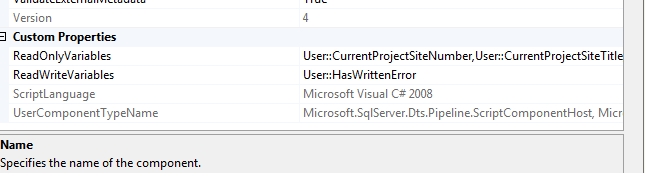
I created an overall variable to track whether or not I have written an error or not, called User::HasWrittenError, and then set it initially to false.  In the step that writes the errors out, I put a script transform task in the data flow, and in the post execute of the data flow script component, I added the HasWrittenError to my script.


In the script task itself, in the post execute, I did the following:

public override void PostExecute()
    {
        base.PostExecute();

        Variables.HasWrittenError = true;
        /*
          Add your code here for postprocessing or remove if not needed
          You can set read/write variables here, for example:
          Variables.MyIntVar = 100
        */
    }

So now that the code sets the HasWrittenError, I added this to each of the logging file steps.

In the file connection manager for the output, I added an expression to set the ColumNamesInFirstDataRow option to @[User::HasWrittenError] != TRUE.


What this allows is that after the first execution, when HasWritten error is "false" it will write the header on the first run, and also create the file, on the second execution through, HasWrittenError will be "true" and thus no header will be written to the file.


Monday, September 9, 2013

Informatica development

So I have been working in Informatica recently, and I haven't really had much to post about as my main specialty is in SSIS/SQL/C# ETL, but it is coming along.  Learning a lot of things, and I may have some time to get tips and tricks out for things I am finding tricky in Informatica. When I have time I think I will give a post about how to pull a single record from a group of records based on sorting, as this is one of the things I think is not well explained in Informatica, and is much easier using SQL.  I also have a complete SSIS examples library to post at some point.  Which was the original point of this whole blog actually, but real life programming concerns have somewhat derailed that ambition.  I also have examples of how you can do quick ETL in C# using sql bulk loader, which I hope to get up on the site as well.  So just a small update that yes, in fact, I am still alive and kicking and still thinking of things to post here.